The e-submission platform will provide an additional functionality for converting the approved
BIM model to the GIS database as per the local GIS Center 3D map data model
The submission guidelines will contain the necessary information regarding the model
geo-referencing so that the model can be automatically positioned and oriented correctly once it
is converted to the GIS database.
The engine will also allow the geo-information to be converted from Geographic Information
System(GIS) database to Building Information Modeling(BIM).
BIM e-Submission Guidelines Development
For the organizations to establish a successful BIM E-submission platform they first need to
define the required standards and guidelines on which the system will be developed. Using
our expertise of the international best practice and standards for BIM alongside our
understanding of other similar systems we will work in partnership with the client to
extract and document all the important components of the system.
This will involve running workshops to consult with your organization on their current
processes and vision for the new system. Our experience comes from years of supporting
clients in the Architectural, Structural and MEP design spaces understand how to meet
standards such as the UK’s BS/PAS1192 suite, the US’s BIM LOD standards and the
international ISO 19650, IFC and COBie standards.
In order to make the BIM submission process more accessible to the supply chain we will work
with these standards to deliver software specific templates which can be used as a basis for
submitting information through the E-submission portal. We will deliver templates for
Autodesk Revit, Bentley AECOsim and ArchiCAD as well as issuing guidance notes on what these
templates contain and how to use them effectively.
Building Permit System e-Submission
e-Submission system is a cloud-based system for the submission of electronic plans and
documents for approval within a secure environment.
Cloud Based e-Submission Module:
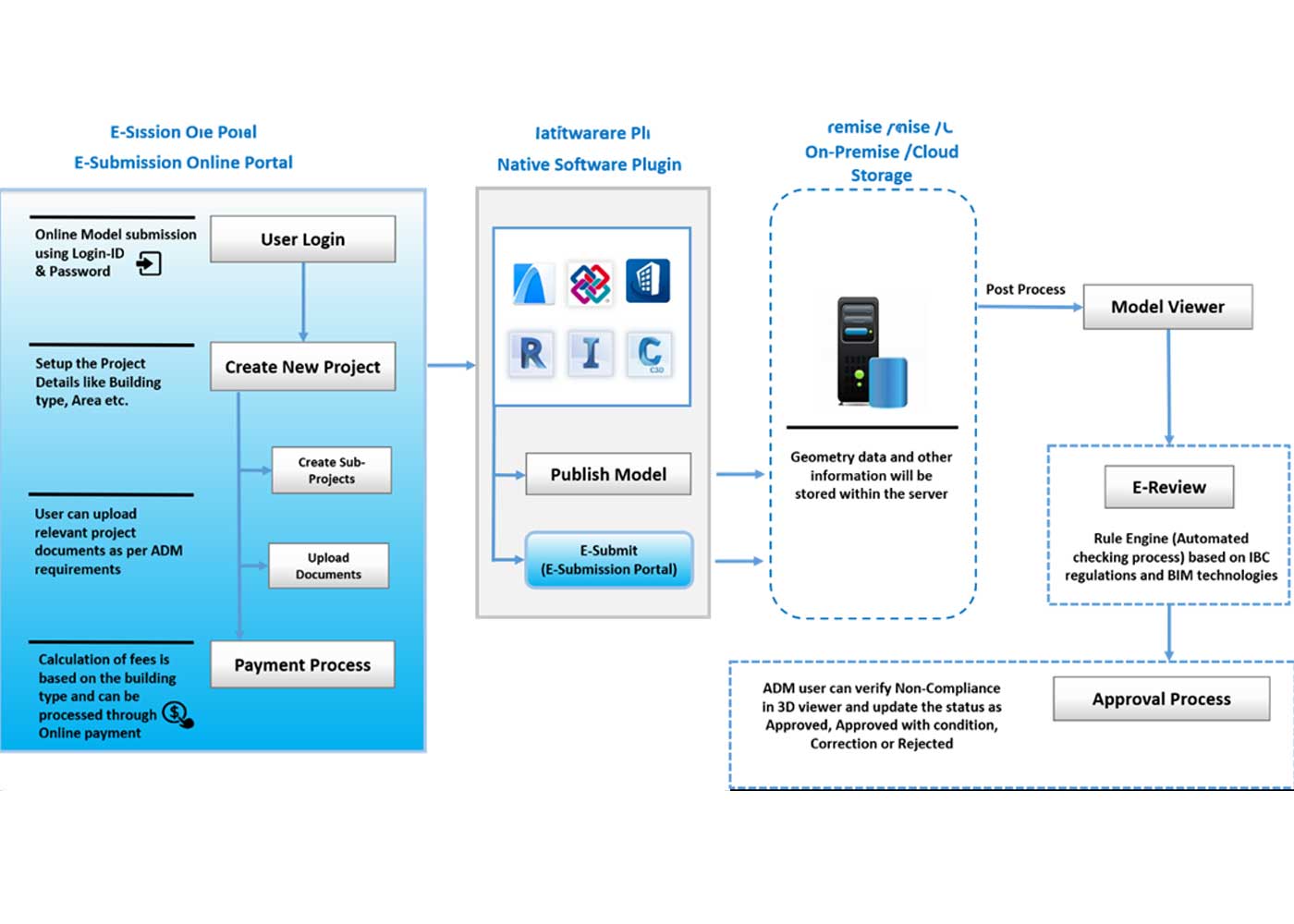
- e-Submission module allows the user to create new project and
submit for e-Review process.
- User can submit Building Permit for New Building or Existing
Building (upgrade, fit‐out, addition, change of use) Projects
- User can upload relevant project documents as per Authority
requirements (application forms, A4 booklet, NOCs, quarterly site progress report,
etc.) and download checklist and procedural guidelines
- User can make the Payments after they create the Project. The
fees depend on type of the building and area of the building
- The following sub-projects will be created by default along
with project creation for Construction Permit division
- Architecture
- Structure
- MEP
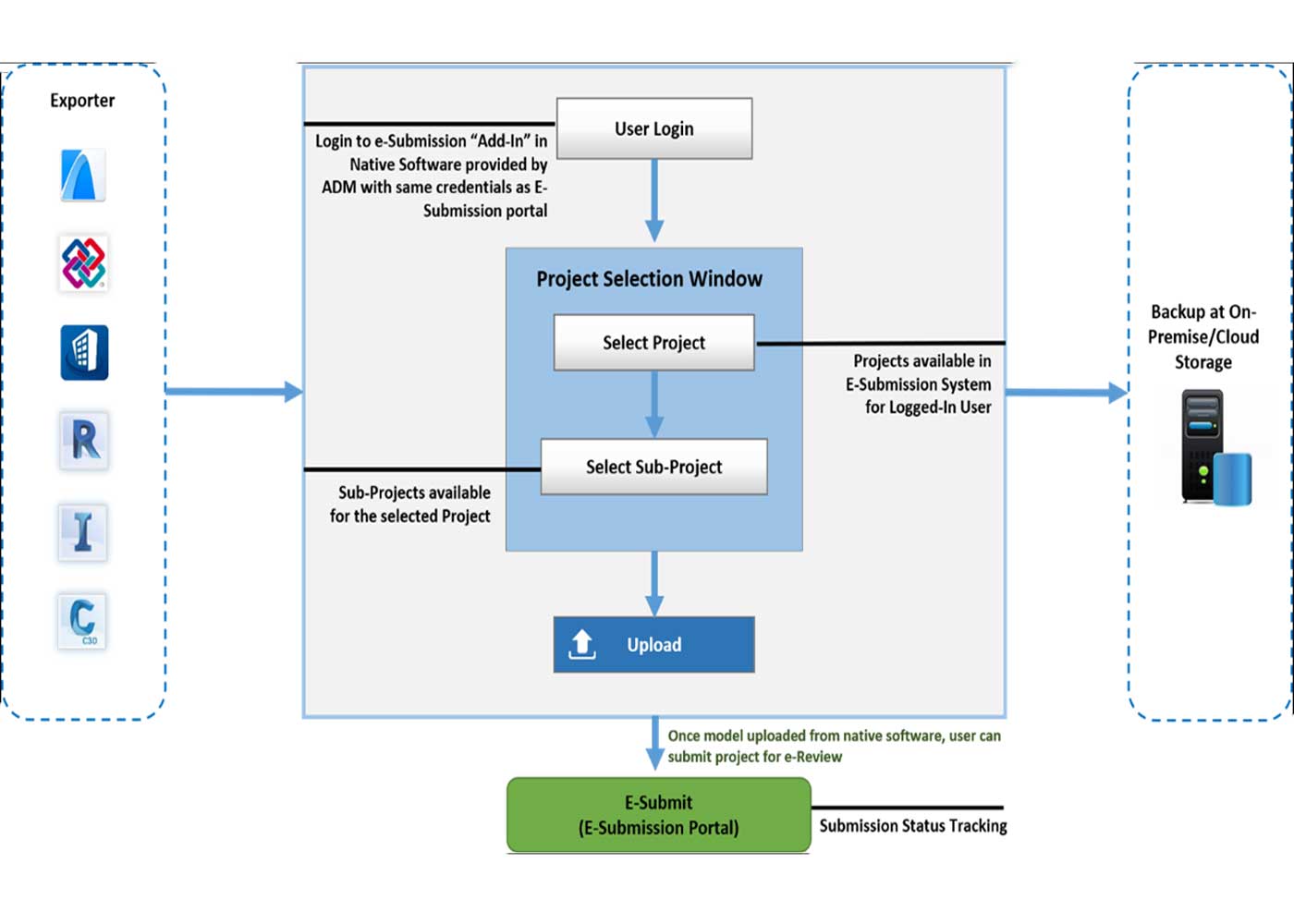
- User can upload model information to sub-projects from Native
software plug-In, the model uploaded status will be displayed for individual
projects
- Once data uploaded successfully from native software, user
can submit project for e-Review
Building Permit System e-Review
e-Review is an automated checking process for native Open BIM files including Revit/Civil
3D/Infraworks files and leading-edge system integrates expert knowledge of IBC regulations
and BIM technologies.
Cloud Based e-Review System:
- Users have access to review submitted projects from
e-Submission portal
- Rule engine will be running in the backend to verify the
model based on the IBC norms
- User can verify Non-Compliance in 3D viewer and Report
summary generated by rule engine and update as Approved, approved with condition,
Correction and Denied
- Project with “Approved” and “Approved with condition” status
will be proceeding to Authority Stamping for Permit Approval
- Project with “Correction” and “Denied” status will be proceed
to Re-Submission process
- Once the Project is reviewed by user, “Correction” will be
maintained as Iteration and “Denied” will be maintained as Revision
- For each Iteration and Revision, model uploaded in the cloud
data storage will be maintained in server for the respective projects
- This process will be followed across all users from
Architecture, Structure and MEP divisions